Small trial
Free
$0
Try Shibutz with 1 small class list before you pay.
- 1 class list
- Up to 25 students per class list
- 3 placement generations per class list
Equal headcounts won't answer every staff question. Who has a familiar peer? Which room is at capacity? Shibutz brings placement rules and student-level results into a reviewable draft, so you can see what still needs a decision.
Start free. Bring a concrete class list to the staff review.
A principal's evaluation path
Evaluation path
Equal headcounts can hide different room limits, split friendships, and support needs. These four checks help you look beyond the totals before the lists go home.
Before the staff review
Enter your roster and approved placement rules, generate a draft, and inspect individual outcomes with staff. Start with a fictional roster to see which checks your team will need.
Setup
Import a small synthetic Excel roster or add fictional students manually. Check the workflow before using school-authorized student data.
Student setup guideRules
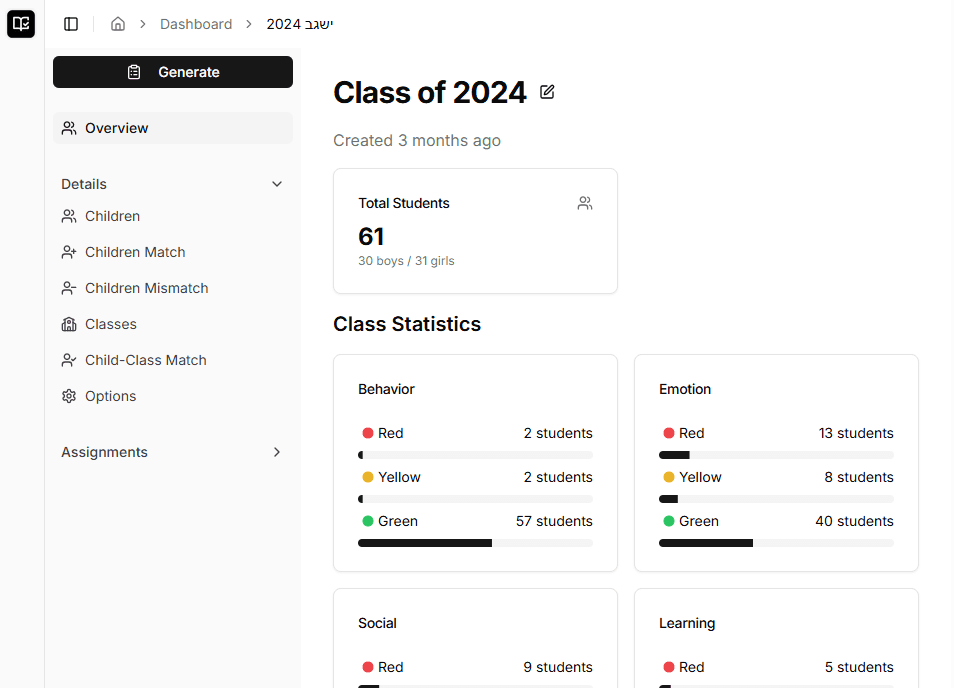
Check class size, friend requests, keep-apart rules, required placements, support needs, and balance settings before generating a placement.
Placement settingsReview
Generated lists stay reviewable: per-class statistics, relationship signals, and regenerate-before-approval controls are visible.
Results reviewDecision
Compare Free and Pro, confirm XLSX export limits, and review the privacy posture before the placement season depends on it.
Pricing and limitsWant the full checklist? Start with the feature coverage or jump straight into a Free trial roster.
Review your first placement draftPlacement workflow
Shibutz does not replace principal judgment. It gives that judgment a structured place to live, then produces a placement your team can inspect before anything is finalized.
Placement workflow
Shibutz keeps the work in order: start from the roster, apply the rules your team agreed on, then review the generated lists with the balance signals still visible.
Why it builds trust
When someone asks why a student landed in a class, the answer is tied back to roster data, placement rules, and review signals; not a hidden spreadsheet formula.
Roster
Upload a spreadsheet or add students manually, then capture the placement details your team already discusses: gender, school, support needs, social context, and learning profile.
Read the student setup guide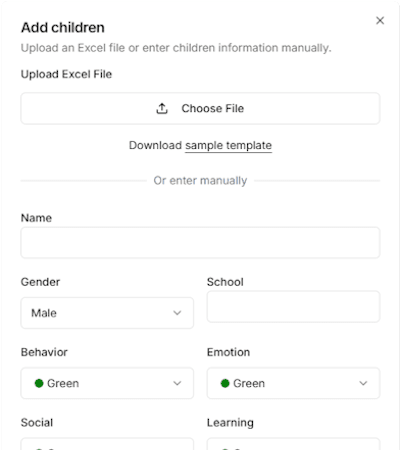
Rules
Set class capacity, balance thresholds, friend requests, keep-apart restrictions, and required placements before asking the system for a placement.
Review placement settings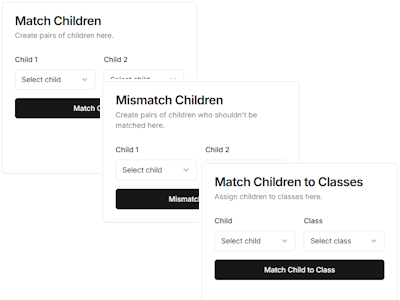
Review
Review classroom statistics and individual placements with staff. If changes are needed, update the workspace rules and generate another draft before sharing.
Understand the results view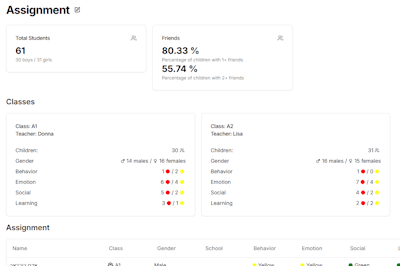
The shift is simple: students stop being rows in a spreadsheet and become reviewable placement decisions.
Before adding a roster, understand how Shibutz uses your information and check your school's privacy requirements.
We use Google Analytics to understand site and product use. Rejecting analytics cookies prevents analytics storage, but usage information can still be sent to Google.
Free includes 1 class list, 25 students, and 3 generated placements. Pro removes those limits and adds XLSX export.
Small trial
$0
Try Shibutz with 1 small class list before you pay.
Final class lists
$199/year
For building final class lists across a grade or school.
Free gives you a real roster test: import students, set rules, generate placements, and decide whether the review flow fits your school.
Card details go through the payment page. Shibutz stores your plan status, not your full card number.
A quick pass through fit, workflow, data handling, and what stays under human review.
A parent request arrives after the draft is ready. Which placements does it affect? Update your workspace rules in Shibutz, generate another draft, and review the tradeoffs before families hear the decision.